Dais API Integration
Use the Dais API to collect product intake, request quotes, and work with policies. Product workflows connect events to actions such as rating, generating documents, or calling an external system.
Events and Actions#
An event identifies what happened or what the caller requests. Its type selects a payload contract. The product workflow determines which configured actions respond, and some event types also have built-in actions. One event can dispatch multiple actions.
Submit events through POST /ioi/v3/event/fire using the shared event envelope. Start with Getting a Quote for a complete request and retrieval flow.
Integration Flow#
The diagram illustrates an event dispatching actions and exchanging data with an external system. Actual actions, mappings, and destinations depend on the integration configuration.
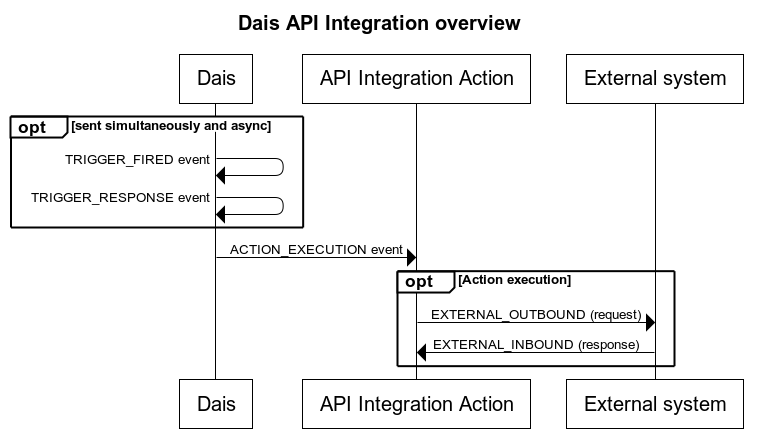
The activity log uses TRIGGER_FIRED for an event submission, ACTION_EXECUTION for action execution, and TRIGGER_RESPONSE for the event response. A trigger response can precede completion of asynchronous actions. EXTERNAL_OUTBOUND and EXTERNAL_INBOUND identify outgoing requests and incoming external responses.
Use the returned triggerRequestId to correlate the event with its results. For GET_QUOTES, retrieve results through the quote API, or use the inline quote results supported by its synchronous flow.
Connecting External Systems#
A webhook action can send a configured payload to an external endpoint. Configure the destination, authentication, and payload mapping for that integration. See Setting Up an Action and Connecting to a Policy Admin System for an example.
The workbench and service bus and premium finance guides illustrate possible integration designs. Implement the necessary actions and message routing for the systems involved.